en


Two things stand between you and the lobby: an account and a way in. The AP33 login itself is short, because it needs only your username and password. Registration asks for a little more, and a few of those fields matter later when you want money out. Below is the sign-up form field by field, the login and password routine, the three app routes on Android and iOS, and the wallet setup you meet straight after your first sign-in.
One point is worth settling first. The general terms set 21 as the minimum age for real-money play, while the tick box on the sign-up form asks you to confirm that you are at least 18. Those two numbers do not agree, so if you are under 21, ask live chat where you stand before you deposit anything. Live chat runs 24 hours a day.
Two house rules also apply from the moment the account exists. Only one active account per person is allowed, so a second sign-up on the same details is not a way around anything. Bots and AI betting tools are treated as a breach: bets placed with them are voided and the account is closed.
Finally, type your full name exactly as it appears on your bank account. The withdrawal form locks the account name to the name on your profile, and payouts to third-party accounts are refused.
The AP33 register form is short and sits behind the Join Now button in the header.
If you would rather not fill in a form, the same page offers registration straight through Google or Telegram. You still end up with an AP33 account in the member area, with the same menu and the same wallet structure.
A username, a password and a mobile number are all the form needs to get you into the lobby.
Tap Login, enter the username and password you chose, and you land in the member area. The AP33 casino login is the same single set of credentials whether you open a slot, a live baccarat table or the sportsbook, because every product runs off one membership.
The header tells you most of what you need. Your member level sits at the top, and a brand new account shows as NORMAL with a sub-level such as NORMAL II. Next to it is your wallet balance with a refresh arrow, a check-in calendar icon, the inbox where messages arrive, a Deposit shortcut and Logout. The left menu splits into Fund, which holds Deposit, Transfer, Withdraw, Instant Rebate and VIP, and Account, which holds Profile, Bank Details, History, Messaging, Referral and Mission Diary.
If you cannot sign in, the route back in is live chat, which is staffed around the clock. Have your username and registered details ready, because the team will want to confirm the account is yours before restoring access.
A few other fixes follow the same path:
Profile carries three tabs: My Profile, Change Password and Change Game Password. The first password is for the member area. The game password is a second credential used where a provider app asks you to sign in on its own screen instead of launching from the lobby. Keeping the two different is sensible, and our habits for keeping your account secure cover why nobody from support will ever ask you for either one.
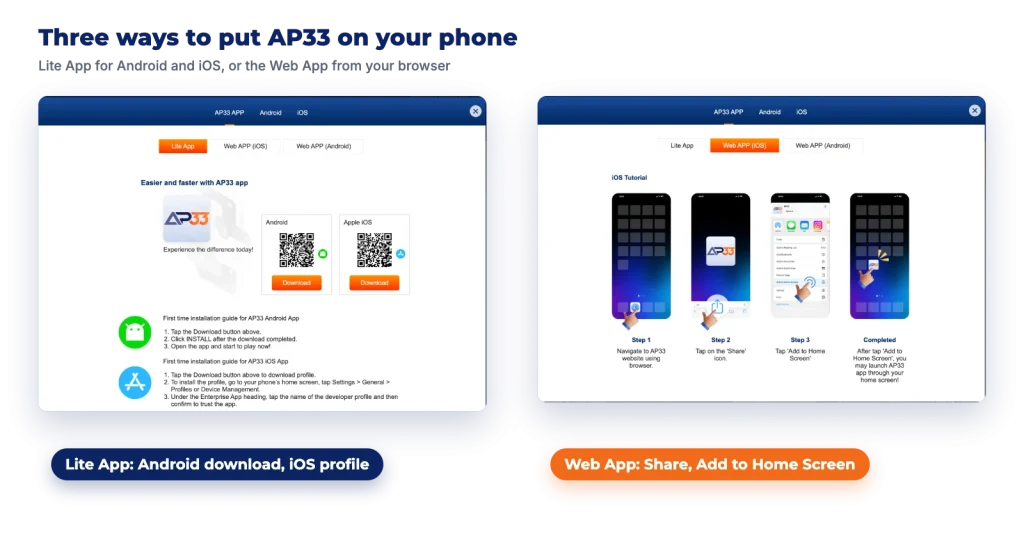
The AP33 download starts from the download icon in the menu, which opens a pop-up with an AP33 APP tab, a Web APP (iOS) tab and a Web APP (Android) tab. That is three different installation routes, not three different products, and the difference matters mostly on iPhone.
| Route | Device | Install steps | Point to note |
|---|---|---|---|
| Lite App | Android | Scan the QR code or tap Download in the pop-up, install the file, then open it | The download comes from the app page rather than a store search |
| Lite App | Apple iOS | Download the profile, then open Settings, General, Profiles or Device Management and trust the enterprise developer profile | In general, iOS keeps an enterprise app blocked until its profile is trusted |
| Web App | Apple iOS | Open the site in your browser, tap Share, then Add to Home Screen | No profile to install or trust |
| Web App | Android | Open the browser menu, then Add to Home Screen | Gives you an icon that opens the same site |
Which one suits you depends on how much setup you want:
The Android tab also lists separate game apps: 918Kiss, Mega888, Joker and Pussy888 for slots, plus Gameplay and WM Casino on the casino side. The iOS tab lists Mega888, Pussy888 and WM Casino. These are the studios that run inside their own software rather than in the browser lobby.
Signing in to them works differently. Transfer funds from your Main Wallet into that provider’s wallet, and a game ID and password appear on that provider’s page in the lobby. Install the app from the download page, then log in with those details rather than your member-area username. Keep the ID somewhere safe, because it is the credential the app itself recognises.
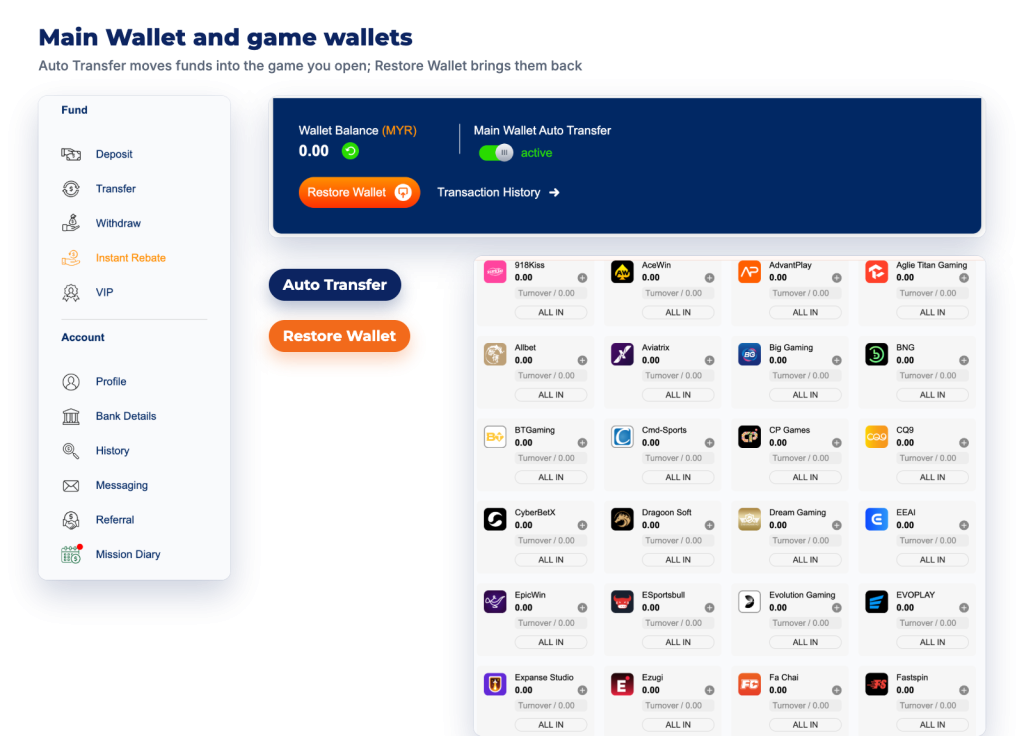
Your balance does not sit in one pot. There is a Main Wallet, and then a separate wallet for each game provider you play. Money has to sit in the provider’s wallet before that provider’s games will accept a bet.
Two switches make this easier. Main Wallet Auto Transfer pushes funds into whichever game you open, so you can mostly ignore the plumbing. Restore Wallet pulls stray balances out of the game wallets and back into the Main Wallet, which is what you want before requesting a withdrawal. The Transfer page handles manual moves whenever you prefer to do it yourself.
Transfers are also where bonuses are claimed. You move at least the minimum amount from the Main Wallet into a provider wallet, pick the promo code on that screen, and the bonus lands in the same provider wallet. While a promotion is still running on a provider, a second transfer into that provider is blocked until the turnover is cleared or the promotion is cancelled, so plan the size of that first transfer rather than topping up in dribbles. If you are still weighing up which lobby to start in, our main guide covers what each product area holds.
Three quick jobs make the account ready for real money. Finish the profile, including the date of birth. Save your bank or e-wallet details under Bank Details, in the same name as your profile. Then make your first deposit, keeping in mind that every deposit carries a one-time turnover requirement before it can be withdrawn, along with the daily caps set out in the deposit and withdrawal rules.
After that, the member area is worth a slow look. Mission Diary, the Reward Mall and the Instant Rebate page all sit a click away from the same menu, and they are the parts of the account that add value while you play.