en


The AP33 Mission Diary is the member-area page that turns ordinary account activity into Reward Points. Logging in earns points. So does a deposit, and so do the valid bets you placed the day before. Each mission shows its own target, its progress bar and the number of points waiting behind it.
Points are a separate currency from your wallet balance. They sit in a Total (Point) figure at the top of the page, and you spend them in the Reward Mall, on the Lucky Spin Wheel, or as coins in the football prediction campaign. They are never cash and they never turn back into a betting balance, so treat them as a side benefit of play you were going to do anyway.
Sign in, then open Account > Mission Diary. The page splits into three tabs: Daily Mission, Weekly Mission and Monthly Mission. Above them you will see your point balance, a Claim All button and a Spin to win button that takes you to the Lucky Spin Wheel.
The daily tab runs on a fixed clock. Its window is 00:00 to 23:59 GMT+8, and a countdown on the page shows how much of the day is left. When the clock resets, the daily list resets with it. Progress on a target does not carry over into the next day, which is why it is worth opening the page once during a session rather than at the end of the month. Everything else the account offers, from the lobby to the cashier, is laid out in our main guide.
Two mission types make up most of the daily list: a simple login and a ladder based on how much you deposited that day. Each step of the deposit ladder is its own mission with its own target and point value.
| Daily mission | Target | Points | Member Day points |
|---|---|---|---|
| Login | Sign in once | 5 | 15 |
| Deposit today | MYR 30 or more | 5 | 15 |
| Deposit today | MYR 100 or more | 13 | 39 |
| Deposit today | MYR 500 or more | 23 | 69 |
| Deposit today | MYR 1,000 or more | 33 | 99 |
| Deposit today | MYR 5,000 or more | 53 | 159 |
| Deposit today | MYR 10,000 or more | 73 | 219 |
| Deposit today | MYR 50,000 or more | 103 | 309 |
So a MYR 100 deposit pays 13 points on a normal day and 39 points on a Member Day. That is the whole arithmetic, so check it before you assume the higher rungs are within reach: the top two steps ask for MYR 10,000 and MYR 50,000 inside a single day.
A second group of missions looks backwards at yesterday instead of today. One ladder counts your previous day’s valid bets across games in the lobby:
| Previous day’s valid bets | Points |
|---|---|
| MYR 1,000 or more | 10 |
| MYR 5,000 or more | 50 |
| MYR 10,000 or more | 130 |
| MYR 100,000 or more | 500 |
A further ladder in the same list also rewards the previous day’s play, running from MYR 1,000 for 5 points up to MYR 1,000,000 for 333 points.
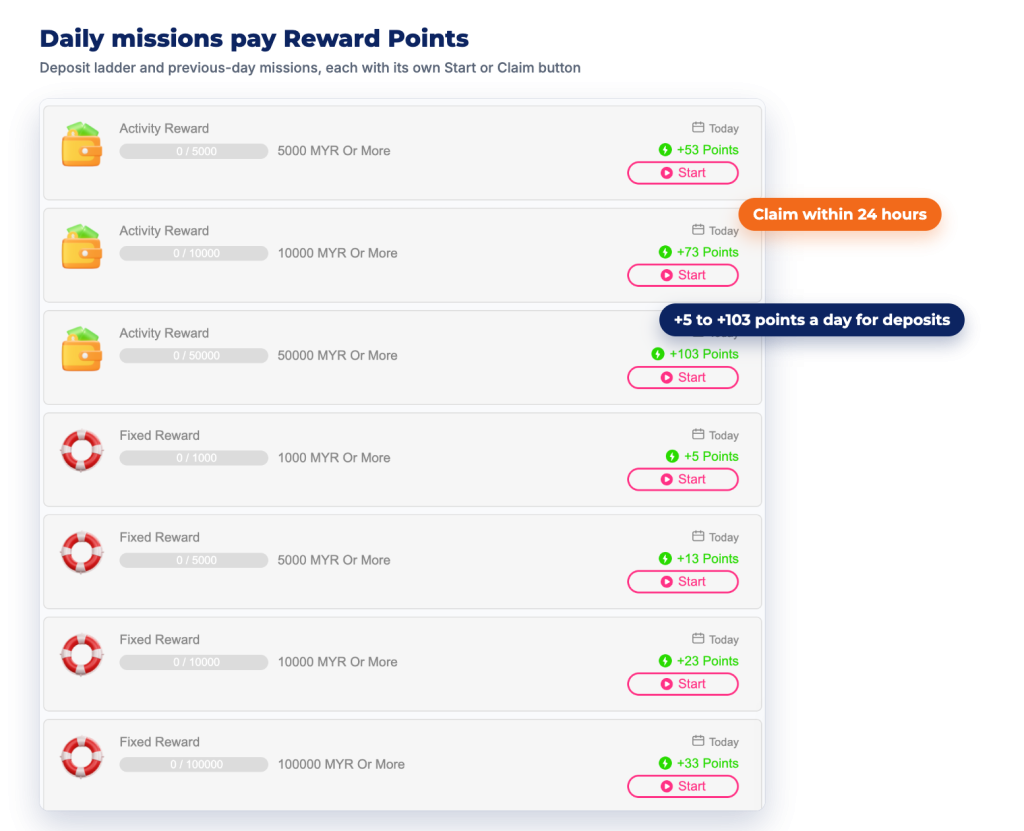
Completing a mission does not credit it. You have to claim it, and the claim itself has a deadline.
Rewards stay claimable for 24 hours after the mission is completed. After that they lapse, and there is no way to recover them. Claiming takes a few seconds, so make it the last thing you do in the member area rather than something you plan to return for.
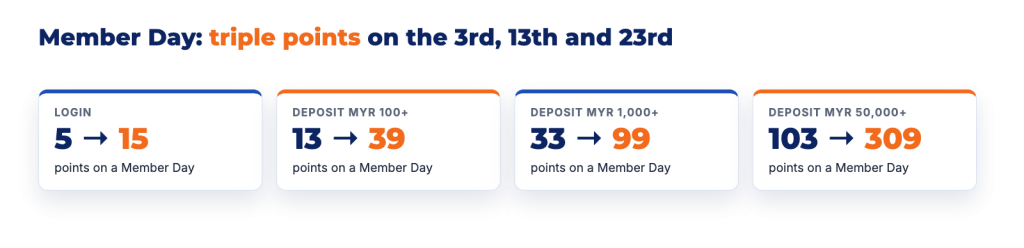
Three dates each month pay triple points on the login and deposit missions: the 3rd, the 13th and the 23rd. The right-hand column of the table above is what those days look like. A login worth 5 points becomes 15, and the MYR 1,000 deposit step becomes 99 points instead of 33.
Each of the three dates counts separately, and claims have to be made on the day itself. One claim per event day applies, the account needs to be verified, and rewards are limited on a first come, first served basis. If you already planned a deposit for that week, moving it onto one of the three dates is the cheapest point boost available. If you had no plans to deposit, the triple rate is not a reason to create one.
Your point balance only grows while the account is active, and the daily window resets every night at 23:59 GMT+8.
The Weekly Mission and Monthly Mission tabs work the same way as the daily list, with their own targets and claim buttons. They are campaign-driven rather than permanent, so a fresh account often finds both tabs empty. When a weekly or monthly mission is running, it shows up there with its target and its point value, and the same claim discipline applies.
Three destinations take Reward Points, and all three draw from the same balance:
That exchange rate matters, because a spin or a prediction entry is a point you no longer have for the mall. Decide which of the three you are saving toward instead of spreading the balance thin across all of them.
The diary is a loyalty mechanic, not an earnings scheme, and a few hard edges are worth naming plainly.
The sensible way to use Mission Diary is in reverse: decide your deposit and your session first, then collect whatever points that activity happens to earn. The ladders are built to reward a bigger day, and the triple-point dates are built to pull your deposit onto a specific date. Neither is a good reason to spend more than you planned.